YouTube thumbnail size: dimensions, safe area and examples
The YouTube thumbnail size is 3840 × 2160 (1280 × 720 works too) at 16:9, JPG or PNG, plus file limits, Shorts sizes and the corner the time stamp covers.

The YouTube thumbnail size YouTube recommends is 3840 × 2160 pixels, at a 16:9 aspect ratio, as a JPG or PNG. The smallest it accepts is 640 pixels wide. 1280 × 720, the size most guides still give, is the same shape and still works well. The file can be up to 2 MB when you upload it from the YouTube app on a phone, and up to 50 MB from a computer.
| What | Size | Aspect ratio | Notes |
|---|---|---|---|
| Video thumbnail | 3840 × 2160 (1280 × 720 works) | 16:9 | At least 640 px wide |
| Shorts thumbnail | 2160 × 3840 | 9:16 | At least 640 px tall; added on a computer |
| Podcast playlist | 1280 × 1280 | 1:1 | Needed to edit a podcast's details |
| File type | JPG or PNG | ||
| File size | 2 MB from a phone, 50 MB from a computer | 10 MB for a podcast's, from a phone |
These are the figures on YouTube's own help page, Add custom thumbnails on YouTube, as of November 2026. The rest of this guide covers what the size alone doesn't tell you: how small a thumbnail is when people actually see it, the corner YouTube covers with the video's length, how big the text needs to be, and how to make one at the right size in boom.design.
3840 × 2160 or 1280 × 720?
Either. For years YouTube's help page gave 1280 × 720; it now recommends 3840 × 2160 and asks for an image "as large as possible", because the thumbnail is also the picture shown in the player before a video starts.
Both are 16:9, so the layout is the same; 3840 × 2160 is simply three times as many pixels each way. That makes a practical way to work: design on a 1280 × 720 page, where text sizes are easy to think about, and download it at 3× for a 3840 × 2160 file.
Two things to watch with the bigger size:
- File size. A 3840 × 2160 PNG of a photo can easily pass 2 MB, which the phone app refuses. Upload it from a computer, where the limit is 50 MB, or save it as a JPG, which is much smaller for photos.
- Don't go below 1280 × 720. YouTube Studio can test up to three thumbnails against each other, and if any one of them is smaller than 1280 × 720, all of them are shown at 854 × 480 for the test.
Any other 16:9 size between the two, such as 1920 × 1080, is fine too. A thumbnail that isn't 16:9 gets bars or a crop.
How big a YouTube thumbnail really looks
You make a thumbnail at 1280 pixels wide or more, but nobody sees it that big. ThumbnailPeak measured YouTube's layouts in October 2026: a thumbnail fills the width of a phone's home feed, 393 pixels on an iPhone 15 and 412 on a Pixel 7. Beside a video on a computer it's 200 to 479 pixels wide, and on a channel's Videos tab on a phone it's 160 × 90.
Here are two thumbnails from boom.design's templates at those three widths, drawn at one scale, each with a time stamp drawn where YouTube puts it:
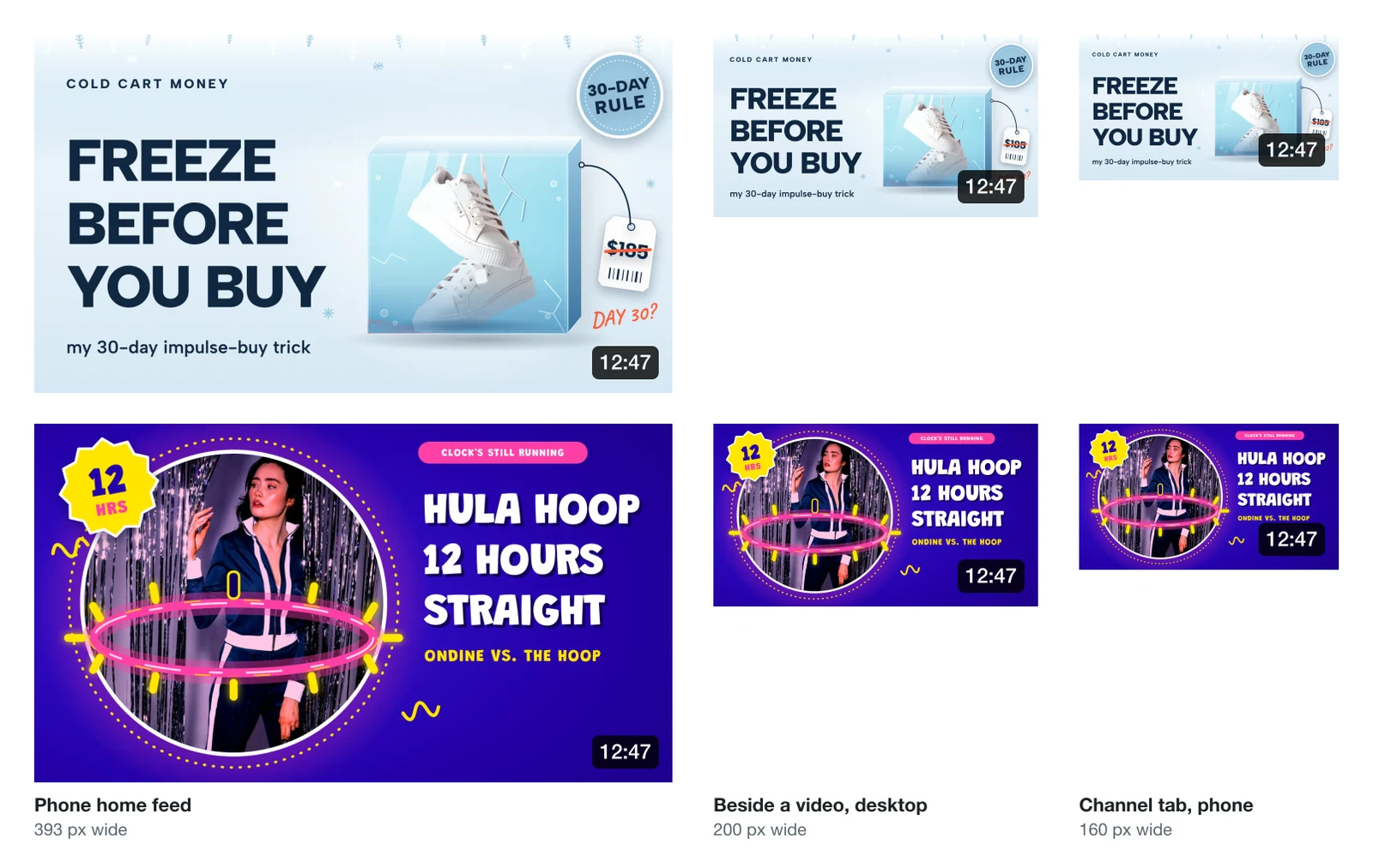
At 160 pixels wide, a 1280-wide design is shown at an eighth of its size. Text drawn 100 pixels tall becomes 12.5 pixels, about the size of the small print on a phone. That's why the big headlines on both still read while the small lines ("my 30-day impulse-buy trick", "Ondine vs. the hoop") turn into a smudge. It also shows something the full-size design hides: the time stamp stays about the same size while the thumbnail shrinks, so at 160 pixels it covers the price tag on the first one.
Check your thumbnail at about 160 pixels wide before you upload it. If the point of the video is still clear, it works everywhere bigger.
The bottom-right corner: where YouTube puts the time stamp
Every thumbnail in a feed carries the video's length in a dark box in its bottom-right corner, and once someone has watched part of a video, a red progress bar runs along its bottom edge. YouTube's help page doesn't give a safe area, but a good rule is to keep anything that matters (text, a face, a price, a logo) out of the bottom-right fifth or so of the thumbnail, and nothing important against the bottom edge.

This snack-ranking template leaves that corner to the ground under the sign, so the badge covers nothing. As the pictures above show, the smaller the thumbnail, the more of it the badge covers, so give the corner a little more room than looks necessary at full size.
How big should the text be on a YouTube thumbnail?
On a 1280 × 720 thumbnail, make the main words at least 100 pixels tall (300 pixels on a 3840 × 2160 one), and keep them to about three words. Shown at 160 pixels wide, that's still the size of readable small print; anything smaller disappears.
A few more things that keep a thumbnail readable when it's small:
- One idea. A face, an object or a number, and a few words. A thumbnail with six things in it shows none of them at 160 pixels.
- Strong contrast. Dark text on a light background or light on dark. Over a photo, put the text on a solid shape or give it an outline or a shadow.
- Don't repeat the title. The title sits right under the thumbnail; the words on the thumbnail can add to it instead.
- Show what's in the video. YouTube's thumbnail policy doesn't allow a thumbnail that makes viewers expect something the video doesn't show.
Shorts and podcast thumbnails
Shorts thumbnails are vertical: 2160 × 3840 recommended, 9:16, at least 640 pixels tall. You can only add one in YouTube Studio on a computer, under Content, then Shorts, not from the phone app. If you give a vertical video a 16:9 thumbnail, YouTube makes a 4:5 one of its own to show on the Home, Explore and Subscriptions feeds on phones, and keeps yours for the rest.
Podcast playlists use a square thumbnail; YouTube recommends 1280 × 1280. A podcast's episodes take the usual 16:9 thumbnail, and boom.design has podcast cover templates for the square one.
Who can upload a custom thumbnail
You need a verified YouTube account: custom thumbnails are one of the intermediate features, unlocked by verifying your phone number. Until then you pick one of the stills YouTube suggests from the video. There is also a daily limit on how many custom thumbnails a channel can upload, which depends on its country and history; if you reach it, try again 24 hours later.
Testing thumbnails against each other in YouTube Studio (Test & compare) needs the advanced features, works on a computer only, and picks the winner by watch time. It isn't available for Shorts.
How to make a YouTube thumbnail in boom.design
boom.design is a design editor with an AI design agent. There are three ways to start a thumbnail at the right size, and the download gives you 1280 × 720 or 3840 × 2160.
Start from a template
The YouTube thumbnail templates are made at 1280 × 720. Open one, press Use this template, and it opens in the editor as your own copy. Click the page's name above it and the bar shows its size: here 1280 by 720.

Or start from a blank page
In the tool rail on the left, open Layers, press Add page and choose Custom size… from its menu. Type 1280 for Width and 720 for Height, and press the plus button to add the page. The size fields on a page's bar change the size of a page you already have.

Or describe the thumbnail
In the Chat, describe the video and the thumbnail you want: "a YouTube thumbnail for my video on cheap camping gear, with a big number 7". The design agent makes a 1280 × 720 page, keeps the bottom-right corner clear for the time stamp, and draws the thumbnail on it, ready to change by hand or by asking. For more on how it works, see what an AI design agent does.
Change the words and the picture
Double-click a text to type over it; the text's bar has Outline and, under Effects, Shadow, which help words stand out over a photo. For a picture, the Images tool searches free photos from Pexels and Pixabay, and Uploads holds your own, such as a still from your video. Select a photo of yourself and press Remove background on its bar for a cut-out you can set over any background; it costs 1 AI credit.
Download it
Press Download, choose PNG or JPG, and pick the Scale: 1× gives 1280 × 720 and 3× gives 3840 × 2160. The free plan downloads PNG and JPG at 1×, which YouTube accepts; the larger scales come with a paid plan. If a 3× PNG comes out over 2 MB and you upload from your phone, download a JPG instead.

YouTube thumbnail templates to start from
These are the newest of boom.design's 65 YouTube thumbnail templates. There are more by style, such as retro thumbnails, and by subject, such as personal finance. They're made at 1280 × 720, with the bottom-right corner left for the time stamp.

Cinematic Window Cleaning Robot Unboxing YouTube Thumbnail

Retro Golden Muskie Fishing Game Completionist YouTube Thumbnail

Minimal Site Plan Parallel Parking Tutorial YouTube Thumbnail

Minimal Desert Dune Saucer Sled Travel Vlog YouTube Thumbnail

Loud Gas Station Snack Tier Ranking Top 10 YouTube Thumbnail

Locksmith Reacts to Movie Heists YouTube Thumbnail

Hard-Hat Worker Repaint Cycle Documentary YouTube Thumbnail

Loud Green Mini Drone Unboxing YouTube Thumbnail
Or describe your video and let the design agent draw one:
YouTube thumbnail questions
Can a YouTube thumbnail be 1920 × 1080?
Yes. Any 16:9 image at least 640 pixels wide works, and 1920 × 1080 sits between 1280 × 720 and the recommended 3840 × 2160. Keep it under 2 MB if you upload from your phone.
Can a YouTube thumbnail be a GIF or WebP?
YouTube's help page names JPG and PNG, and those are the two to use. Older guides list GIF and BMP as well. Save a JPG for a photo and a PNG for flat colors and text.
Why does my thumbnail look blurry?
Usually because it was made smaller than 1280 × 720 and scaled up, or saved as a JPG with heavy compression. Make it at 1280 × 720 or larger; where YouTube shows it big, such as in the player before a video starts, a 3840 × 2160 file stays sharpest.