Employee of the month certificate: wording and templates
What to write on an employee of the month certificate: 22 wording examples by reason, free templates to edit online, and how to print it on letter paper.

An employee of the month certificate needs six things: the award's title, the employee's full name, the month and year, one sentence saying what they did, your company's name or logo, and a date with one or two signatures. The sentence is the part people remember. "For outstanding dedication" fits anyone. "For covering 14 extra shifts in March so the store never closed early" fits one person, and they will keep it.
Below: what goes where on the page, how to write that sentence, 22 examples sorted by reason, free templates you can edit online, and how to print one that looks right on letter paper.
What goes on an employee of the month certificate
From top to bottom, in order of size:
- The award's title. "Employee of the Month" is the usual one. "Team Member of the Month", "Star of the Month" or a name that belongs to your workplace ("Order Up Award" in a diner) work too.
- The employee's name, the biggest words on the page. Spell it the way they spell it, with a nickname only if they go by it at work.
- The month and year, near the title or the name: "March 2027". A certificate without one could be from any year.
- The reason, one or two sentences in plain type (more on it below).
- Your company's name or logo, small, at the top or in a seal.
- The date and signatures: a line for the owner or manager, often a second for the person's direct manager, and the date it was given.
Lines like "Proudly presented to" or "In recognition of" are optional. They fill space on a formal certificate and can go on a casual one.
Here is one that has all six. The reason names the month, the job and a number:
How to write the reason
A good reason line answers "what did they do, and what came of it?" in under 35 words. Four rules get you there:
- Name one thing. Not "for hard work, positivity and teamwork". Pick the one moment the team will recognize.
- Put a number in it when there is one: orders, calls, days, dollars, five-star reviews, weeks without an incident.
- Say what it changed for customers, for the team or for the business.
- Write it in the past tense, as something that happened: "for rebuilding the stockroom", not "for being organized".
Compare:
| Vague | Specific |
|---|---|
| For excellent customer service | For answering 412 support tickets in May with a 98% satisfaction score, the team's best this year |
| For being a great team player | For training both new hires in their first two weeks, while keeping her own route on time |
| For going above and beyond | For driving the last 40 boxes to the food bank himself when the truck broke down on the Friday of the drive |
If you can't name the one thing, ask the person who nominated them. If nobody can, that month may not need a winner.
Employee of the month wording examples
Adapt these to your own people and numbers. Each is written to fit on one certificate.
Customer service
- "For turning a double-booked wedding party of 60 into the reception they still write to us about."
- "For 31 five-star reviews in April that named you, more than anyone in the shop has had in a month."
- "For staying on the phone for an hour and ten minutes until Mrs. Alvarez's internet was back on."
- "For learning enough Spanish this month to take orders from every customer who came in speaking it."
Sales and results
- "For closing the Hartwell account, our largest new client of the year, after six months of follow-up."
- "For selling 112 memberships in June, 40 more than the next best month on record."
- "For bringing returns down from 9% to 4% by rewriting how the fitting room is run."
Teamwork and mentoring
- "For training three new line cooks in April while covering every Saturday double."
- "For answering every new hire's questions in the team chat, usually before anyone else had read them."
- "For taking on the inventory count when Dana was out, and finishing it a day early."
Reliability and attendance
- "For 22 opening shifts in a row this month, every one of them on time."
- "For covering 14 extra shifts in March so the store never closed early."
- "For closing the books on the first business day of the month, with every report in before anyone asked."
Safety
- "For spotting the frayed forklift cable on the 9th and stopping the line until it was replaced."
- "For leading the fire drill that cleared the building in under three minutes, our fastest yet."
- "For 90 days in the warehouse without a single recordable incident on your team."
Going above and beyond
- "For rebuilding the stockroom over two weekends, so every order now ships the day it comes in."
- "For organizing the coat drive that collected 260 coats for Lincoln Elementary."
- "For keeping the front desk running alone during the November storm, when no one else could get in."
A hard month or a busy season
- "For working every Black Friday shift and still smiling at the last customer at 11 p.m."
- "For the tax season that would have broken anyone else: 318 returns, no late filings."
- "For keeping the kitchen calm through the week the walk-in failed."
Award titles and openings
- Employee of the Month · Team Member of the Month · Star of the Month · MVP of the Month · Shift Hero
- "Proudly presented to" · "Awarded to" · "This certificate recognizes" · "With thanks to"
Employee of the month certificate templates
These are free to edit in boom.design. Each was made for a different kind of workplace, from a diner and a ballpark to a hospital, a warehouse and a hotel, with a sample name and reason you replace with your own. All of them are on the employee of the month certificate templates page, and more awards on the certificate templates page.
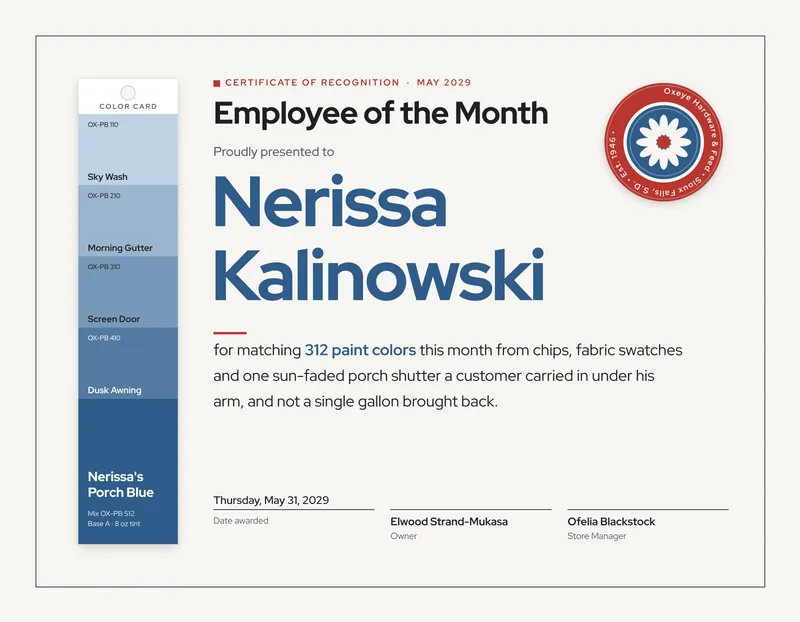
Minimal Paint Chip Hardware Store Employee of the Month Certificate

Hand-Painted Produce Sign Grocery Co-op Employee of the Month Certificate

Engraved Bond Insurance Claims Employee of the Month Certificate

Minimal Resistance Band Physiotherapy Employee of the Month Certificate

Classic Nursing Pin Hospital Employee of the Month Certificate

Bold Trail Blaze Sporting Goods Employee of the Month Certificate

Warehouse Aisle Sign Distribution Center Employee of the Month Certificate

Kid-Voted Gold Star School Custodian Employee of the Month Certificate

Drawing Sheet Architecture Firm Employee of the Month Certificate

Bold Diner Letter Board Employee of the Month Certificate

Classic Waterworks Plaque Employee of the Month Certificate

Minimal Ski Resort Employee of the Month Certificate
How to make an employee of the month certificate in boom.design
boom.design is an online design editor with an AI design agent. Its certificates are set up for US letter paper, landscape, so they print without resizing.
1. Start from a template
Open a certificate from the templates above and press Use this template. You'll be asked to sign in if you aren't (a free account is enough), and the certificate opens in the designer as a project of your own.

2. Change the name and the reason
Double-click a text on the page to type into it: the name, the month, the reason, the names under the signature lines. To change a font, select the text and pick one from the Font field in the bar above the page.

3. Add your logo and colors
If you have a brand kit, open the Brand tool in the tool rail and click a logo to place it on the page. Your brand's colors come first in every color picker, so you can recolor the border or the seal to match. Without a kit, upload the logo in the Uploads tool and click it to place it on the page.
4. Leave the signatures for the pen
A certificate signed by hand means more than a printed signature, so leave the lines empty and sign after you print. If you need it printed, for a team that works remotely, upload a PNG of the signature with a transparent background in the Uploads tool and click it to place it over the line.
5. Make next month's in the same design
Your certificates match month after month if they all come from the same design. Open the Layers tool, press the … button beside the page and choose Duplicate page, then change the name, the month and the reason on the copy.

A project holds 5 pages on the free plan and 20 on Starter, so a year of winners fits in one Starter project. On the free plan, start a new copy of the template when the first fills up.
6. Download it
Press Download and choose the format:
- PNG or JPG at 1× gives one picture per page, sharp enough to print at full size. These are on every plan, the free one included.
- PDF gives one document with every page in order and keeps the text sharp at any size. It comes with a paid plan.

Choose a single month in Pages to download just that one, or all pages for the year.
Or describe the certificate you want
The design agent can make one from a sentence. It asks a few questions first, such as whether you'll print at home or at a shop, and then draws the certificate at the size for that.
How to print an employee of the month certificate
- Paper size. US letter (8.5 × 11 in), landscape. The templates are 3375 × 2625 px: 11 × 8.5 in at 300 pixels an inch, plus 1/8 in of background past each edge for a print shop to trim.
- At home, choose Landscape and Fit to page (some printers say "Scale to fit") in the print dialog. Most home printers leave a thin white margin around the page; on a certificate with a border, that margin looks intentional.
- Paper. Card stock reads as a certificate where copy paper reads as a memo. Check the heaviest weight your printer takes before you buy: many home inkjets handle card stock around 65 to 80 lb cover. Matte or linen-finish stock takes a pen better than glossy, which can smear a fresh signature.
- At a print shop, send the PNG or the PDF and ask for letter size, trimmed. The extra 1/8 in is there for the cut.
- A frame for letter paper (8.5 × 11 in) fits it as it is, and an 11 × 14 in frame with a mat cut for letter paper looks more formal. One frame on the wall, with a new certificate slipped in each month, makes a "this month's winner" spot that costs one frame a year.
Picking the winner so it means something
A certificate is only worth as much as the choice behind it. A few habits keep employee of the month from turning into a popularity contest or a rotation:
- Ask for nominations with a reason, and choose on the reasons, not on how many people voted.
- Have two people decide, and change who they are now and then.
- Look past the front of the house: the cook, the night shift, the person in the stockroom.
- Don't give it to the same person twice in a year, unless the second time is for something new.
- Skip a month if nothing stood out. A certificate given because it was due says less than none.
The reason you write on the certificate is the same one you chose them for, so writing it down first does both jobs.
How to present it
Read the reason out loud, at a team meeting or the start of a shift, and hand over the certificate in front of the people who saw them earn it. For a team that works remotely, post the PNG in your team chat or email with the reason in the message, and mail the printed copy. Ask before you post a photo of the winner anywhere public.
Employee of the month certificate questions
What do you write on an employee of the month certificate?
The title, the employee's name, the month and year, one specific reason, your company's name or logo, and the date with a signature. The reason should name one thing they did, with a number if there is one.
Is there a free employee of the month certificate template?
Yes. The employee of the month certificate templates on boom.design are free to edit online and download as a PNG or JPG on the free plan, without a watermark.
What size is an employee of the month certificate?
In the US, letter size (8.5 × 11 in), almost always landscape. Outside the US and Canada, A4 (210 × 297 mm) is the usual size.
Can you give employee of the month every month?
You can, but a month with no clear winner is better skipped. An award given every month whatever happened soon stops meaning anything.